Understanding the Need for BPM Solutions for Successful Business Operations

What are BPM Solutions?
Business process management solutions optimize and accelerate processes for better operational efficiencies. The goal of a business process management solution is to improve efficiency and minimize inconsistencies and errors in the process.
The main focus of BPM solutions is at the process level rather than at the task level. By implementing BPM solutions, processes throughout the organization are standardized so that human errors are reduced and process gaps are sealed.
However, BPM should not be considered as a project or operations management solutions. BPM is not software, but the tools used to implement BPM strategy are software tools. Software tools are used for designing, automating, testing, and implementing BPM solutions at department-wide and organization-wide scales.
The key processes in BPM include risk management, business process modeling, business process outsourcing, employee motivation, and product inventory management.

Benefits and limitations of BPM solutions
BPM solutions offer several advantages to the business, including,
Guides management in making informed decisions
Prioritizes and routes work automatically
Standardizes resolutions across geographies
Provides real-time visibility and control into process status and outcomes
Improves forecasting and productivity
Enhances productivity
Increases efficiency
Reduces costs
Lowers process costs
Accelerates process execution
Improves customer experience
Enables teams to handle exceptions faster with minimal errors, reducing errors
Increases transparency and visibility
Improves compliance with the process
Reduces dependency on development teams by offering low-code features
There are, however, a few drawbacks of BPM that businesses must bear in mind before going for automating their business processes. Some of the BPM solutions are not capable of scaling up to the growing organizational needs of businesses. Another drawback is that BPM solutions do not allow processes to be repeated.
Various BPM solutions can be implemented for business workflows as per the unique requirements of the organization. The benefits of implementing BPMN exercises and solutions can be applied across the organization. However, before implementing the BPM solution, it must first be determined if the process is suitable for BPM and whether the business can enjoy tangible benefits by implementing the solution.
Process That Can Be Efficiently Automated
Here are some of the business processes that can benefit from implementing BPM solutions.
Accounts payable and accounts receivable * CapEx approvals * Finance approvals * Enterprise integrations * Human resource management processes * Facilities management
Compliance management * Procurement management * Supply chain and inventory management
During the initial growing stage of a business, following old-fashioned ways of running a business may work well. However, as the business grows, the processes grow in their complexity, and the ability to add processes within a BPM system becomes essential to handle new or more complex workflows. Archaic manual methods like exchanging business data via Excel sheets or passing clipboards to get approvals may not be effective.
Easy and simple as they may seem, manual methods are not effective at scale. Moreover, the lack of standardization makes it difficult to measure critical performance metrics.
Archaic methods are prone to human errors and bias. The errors and inconsistencies that occur in manual processes put the business at risk. Redundancy in business processes brings down the quality of customer service. To stay competitive, businesses need to improve their customer experience and adhere to compliance standards.
Businesses cannot deliver superior standards of customer experience by using manual processes. Old-fashioned methods to run a business are characterized by the exchange of information via emails and paperwork. The sheer volume of email exchanges between the stakeholders increases the chances of misplacement or missing information. The high volume of paperwork poses an issue in terms of storage and likely damage to important business data.
BPM solutions address all of the above shortcomings of manual processes. Business process automation enables organizations to digitize and streamline workflows, improving transparency, accountability, and operational efficiency. BPM methodologies complemented by low-code automation software like can improve business processes and bring about best practices in day-to-day work practices. When BPM solutions are properly implemented, the productivity of business processes improves significantly and errors, risks, and costs are minimized.
Key Features of BPM Software
Most of the BPM solutions available in the market offer a standard set of features for streamlining key business processes. Leading BPM software also provides robust automation capabilities, strong integration capabilities, and supports integrated solutions, enabling seamless business operations across departments. Some of the common features of BPM software are:
1. Automation of processes
BPM software must help in managing the transfer of tasks between employees, and its automation capabilities are essential for routing tasks and reducing manual effort.
2. Business Rules
Preset business rules govern the sequence of business processes. For example: if event A occurs, then proceed as usual; and if event B occurs then end the process. Exception handling must be taken care of by the software.
3. Process monitoring and feedback
BPM software must provide visibility into all the tasks of the process. Users must get a top-down view of the performance of all processes, deadlines, and bottlenecks.
4. Drag-and-drop builder
The software must provide an easy-to-use drag-and-drop form builder. A visual form builder simplifies the task of creating forms and can play a role in streamlining document review processes.
5. Pricing
As with any investment, the purchase of BPM software must provide value for the money invested. The terms and conditions stipulated during software purchase must be clear and transparent. The break-up of installation, maintenance, and support costs must be clarified by the software provider.
6. Software integrations
The BPM solution will not operate as a stand-alone system. It should offer strong integration capabilities to connect with core business systems such as CRM, RPA, and APIs. Smooth integration with other systems ensures the easy exchange of information between the systems.
7. Admin features
The software must provide an in-house admin feature that allows the admin to adjust tasks, forms, and items as required. Role-based access control must be provided by the software so that information is protected from unauthorized usage or viewing.
8. Customized alerts and notifications
The automation software must issue alerts and notifications to appropriate stakeholders in the process to inform them of approaching approval deadlines or pending reviews or approvals.
How to Automate Business Processes
Implementing a BPM solution requires careful study of existing processes via process mapping. Mapping existing processes helps in identifying the bottlenecks and tasks that are ideal for automation. Real-time reporting in BPM provides visibility into workflows, helping to identify bottlenecks and evaluate KPIs, ensuring continuous process improvement.
The BPM lifecycle, which refers to the structured stages of implementing Business Process Management, is described below:
Design
This step involves identifying existing processes and your to-be processes. The existing processes with the steps are mapped using visual flow diagrams or flow charts. The entire process is mapped along with factors like alerts, notifications, escalations, and SOPs. All types of processes, human-to-human, human-to-system, or system-to-system can be mapped using visual flow diagrams.
Modelling
Once the process is mapped, the next step is to create various models that explore how the process would operate under different circumstances. This can be done by varying the input and the conditions under which the process operates.
Execution
The process to be automated is mapped completely. The mapping includes details like which process to automate, where and to whom the tasks will be routed, and the possible outcomes of every task. The team will be ready to build the new automated process equipped with all these details. Workflow automation software like Cflow enables no-code mapping of process workflows. The visual workflow builder in Cflow enables even team members without technical backgrounds to create process workflows easily.
Monitoring
The workflow software provides a visual dashboard that enables team members and management to monitor and track the status of the process. The visual interface allows users to locate requests in real-time, detect process gaps, and analyze process bottlenecks.
Optimization
The newly automated process must be assessed continuously and performance must be measured in order to make improvements. Process performance must be retrieved with relevant reports to identify potential opportunities for further cost and time savings. Constant monitoring of process performance helps in optimizing the process.
Re-engineering
While monitoring the new process it is possible that the team realizes that there could be more efficient ways of executing the process or some unnecessary steps that need to be removed. The monitoring and optimization phase helps identify the extraneous steps that, when removed from the process improve its efficiency and productivity.
The Role of BPM in Enhancing Customer Experience
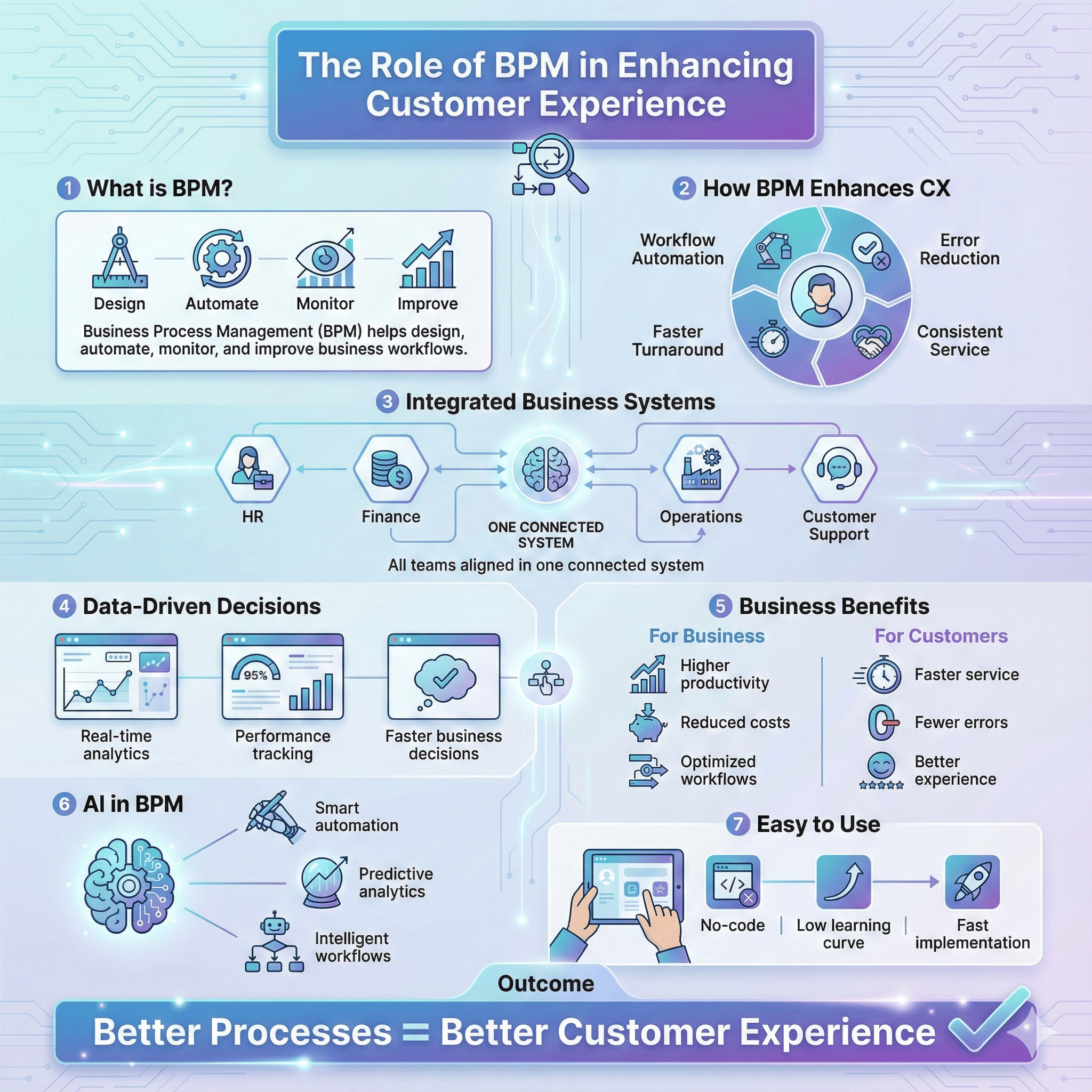
Business process management (BPM) is a powerful driver for elevating customer experience by streamlining operations, boosting operational efficiency, and optimizing business processes across the organization. By leveraging advanced bpm software, companies can automate workflows, minimize errors, and access real-time analytics, empowering teams to make informed decisions that directly impact customer satisfaction and loyalty.
A well-implemented business process management system integrates diverse business processes—such as human resources, finance, and marketing—into a cohesive, structured environment. This seamless integration enables organizations to automate processes and manage complex workflows, resulting in enhanced productivity, reduced costs, and improved business performance. With BPM methodologies, businesses can continuously monitor process performance, identify opportunities for process improvement, and optimize workflows to deliver better business outcomes.
Key features of modern business process management tools, including advanced analytics, workflow automation, and process optimization, provide organizations with actionable insights into their operations. These capabilities allow business users to quickly adapt to changing customer needs, respond to market demands, and deliver a superior customer experience. By automating repetitive tasks and reducing redundancies, BPM solutions free up valuable human resources to focus on high-value customer interactions and strategic initiatives.
BPM software is designed with user-friendly, intuitive interfaces that require minimal training, making it easy for business users to adopt and manage workflows. This reduces the learning curve and accelerates the implementation of new processes, enabling organizations to realize improved efficiency and enhanced customer experience more quickly. Real-time analytics and reporting features further support data-driven decision making, allowing businesses to proactively address issues and continuously refine their customer service strategies.
Aligning BPM strategy with business goals and requirements is essential for maximizing the impact on customer experience. By carefully designing and implementing BPM solutions that address specific business needs, organizations can streamline existing processes, add new capabilities, and reduce operational costs. The integration of artificial intelligence within BPM software further enhances its ability to provide insights, automate complex workflows, and support ongoing business transformation.
Ultimately, business process management plays a critical role in delivering exceptional customer experiences by optimizing operations, improving process performance, and enabling organizations to adapt quickly in a competitive landscape. As businesses continue to evolve, investing in robust BPM solutions will be key to achieving better business outcomes, driving customer satisfaction, and sustaining long-term success.
How to Choose the Right BPM Solution
The choice of the BPM software impacts the success of implementation. The success of various BPMN exercises and solutions has a direct bearing on the rate of ROI of the software. It is not enough if you choose a feature-rich BPM solution alone, it must also cater to the requirements of your business. User-friendliness is crucial when selecting BPM software, as it can significantly reduce onboarding time and improve team adoption. When evaluating business process management software, consider how well it addresses your organizational needs and supports infrastructure management to ensure alignment with your overall enterprise goals.
There are several BPM solutions providers in the market. Here are a few pointers that will help you choose the right BPM solution for your business.
What is the level of automation that the software provides?
The main intent of going for BPM solutions is to relieve human resources from mundane, admin tasks. The level of automation provided by the BPM solution determines the extent to which team members are relieved from such activities. When more steps/tasks are automated by the software, the time and cost savings for the business are proportionally greater.
The BPM software available in the market is specifically designed to suit the requirements of small–, mid-, and large-scale businesses. Choose the right one as per the nature and size of your business.
Does it provide the dynamic approval feature?
Most business workflows get stuck at the approval stage when the approver fails to notice the pending approval or misses the deadline for approval. By providing the dynamic approval feature, the need for manual review and approval is avoided. The request is reviewed based on preset business rules that are provided in the software and approved or rejected automatically without the intervention of the employees. The dynamic approval feature saves the team a lot of time and costs by approving requests on time.
Are electronic forms available for gathering data?
Gathering important customer data via electronic forms is very useful for the business. Updating and storing electronic forms is easy and effective. Customer data can be retrieved and referenced at any time conveniently by extracting relevant forms from the database. The BPM solution must provide electronic forms for gathering customer data.
How is business activity monitored?
The BPM solution must provide business activity monitoring (BAM) features that enable the entire team to stay updated on the status of process/project requests. A user-friendly interface must provide the business activity monitoring data in a clear and concise format that everyone can understand. The BAM dashboard must be devoid of complex abbreviations or notations that confuse the users.
Are there automated notifications and alerts issued?
BPM software must issue alerts and notifications automatically to garner the attention of the user. Any exception or unusual activity must be flagged off and notified to the user so that appropriate action is taken. Automated notifications and reminders to stakeholders in charge of request approvals ensure that invoices and other approvals happen on time and the process is not delayed or stuck due to delayed approvals.
Is the pricing policy transparent?
The business process management solution must be value for money. The pricing terms and conditions must be accurately declared to the customer prior to investment. There should be no hidden costs in the pricing of the software. If there are any discounts or rebates on the price of the software, they must be communicated duly to the customer. Similarly, any increase in the price of the software must be informed before the renewal of the purchase contract so that the customer can make an informed purchase decision.
Is the software customizable and flexible to suit specific business requirements?
One of the most important features of workflow automation software is customization and flexibility. The automation solution must be easily customizable according to the requirements of the business.
The rules engine of the workflow software must be customizable to accommodate preset business rules that run the processes. Also, as the business scales up, the software must be flexible enough to accommodate the new, upgraded business requirements.
Does the software support integrations?
BPM solutions operate along with other business systems that are already in use. Seamless integration with other business applications is a must for the BPM solution. Integrated solutions enable seamless collaboration and automation across departments, ensuring that tools for process mapping, automation, and monitoring work together efficiently. When the solution coordinates and communicates seamlessly with other systems, data exchange, and updation happen smoothly. The BPM solution must integrate with other systems via API interfaces.
Does it support on-premise and cloud installations?
While some organizations operate on the cloud, some organizations are still using on-premise applications. The BPM solution must be compatible with both on-premise and cloud installations. This flexibility in the working model increases the rate of adoption of the software. After-sales customer support also must be available for both on-premise and cloud installations.
How is the post-sales customer support?
Workflow automation is not a fit-and-forget kind of solution. Customer support after installing the software is a must for the service provider. Any user issues or change requests must be handled efficiently and immediately with the right customer support.
One of the most popular and trusted BPM software that provides all of the above features and many more useful features is Cflow. Cflow is a leading workflow no-code automation software that can automate key business processes within minutes.
The visual form builder in Cflow enables employees without any technical background to build workflows with ease. The workflows can be customized according to the unique requirements of the business.
Top 6 BPM Solutions for 2026
Is workflow automation on the cards? We have you covered. The top 6 BPM solutions in the market for 2026 have been listed below. This list features leading business process management software with advanced workflow management capabilities, helping organizations automate, integrate, and optimize their core business processes. We have prepared the list based on multiple online inputs from Gartner reviews, etc.
BPM Solution | Suitable for | Top Features | User Interface | Installation | Integration |
|---|---|---|---|---|---|
Cflow | SMBs-to-Mid-to Large-sized organizations | * No-code * Easy changes to workflows, forms, and data * Unified data and document management * advanced analytics and reporting | Intuitive dashboards and e-portals for real-time tracking of users | Supports cloud and on-premise installations | Integrates with ERP, CRM, and Document management portals via API interfaces |
Appian BPM Suite | Enterprise solution | * Complete suite of automation features * Robotic process automation for routine tasks * BPM for optimizing complex tasks * Case management for exception handling | Intuitive and easy-to-understand dashboards to track business activity | Supports cloud and on-premise installations | Manual integration done by Appian engineers |
Nintex | SMBs and enterprise | * Web-based drag-and-drop interface * Automatic generation, signing, and storage of documents * Real-time alerts and notifications * Delegate tasks to RPA | The interactive user interface for planning, mapping, and governing | Cloud and on-premise deployment | Integrates with specific software solutions |
IBM Blueworks | Enterprise solution | * automates process via business mapping * Process simulation for analysis of process performance and improvements | Intuitive and easily accessible web interface | Cloud and on-prem deployment | Integrations via Open REST API |
Bizagi | SMBs and enterprises | * create applications on a global scale * enables collaboration in fusion teams * data-driven personalized, contextualized user experiences * Integrates disparate data, systems, and people | Custom contextualized UI for all Bizagi applications | Cloud and on-premise deployment support | Integrates with specific software solutions |
Tallyfy | SMBs, Mid-Large enterprises | * web-based drag-and-drop user design * trackable approvals and task statuses * Real-time BI feed | Intuitive dashboard that captures the status of any process in real-time | Cloud-based deployment | Open REST API and 3rd party integration via Zapier |
Conclusion
Superior customer experience and engagement are key to gaining a competitive edge. Following archaic manual business processes is an impediment in the path to providing quality customer service. Managing business processes using BPM solutions is a great way to improve business outcomes and maintain the quality of customer service.
The decision to automate business processes must be backed by the choice of the right BPM solution. Choose a solution that fits your business requirements and provides complete value for money. Organizations across the globe choose Cflow as their process automation partner.
A no-code BPM solution that is best suited for SMBs and enterprises, Cflow is the total value of your investment. Power up your decision to automate business processes by choosing a feature-rich workflow automation solution like Cflow. Sign up for the free trial to learn more about Cflow.
What should you do next?
Thanks for reading till the end. Here are 3 ways we can help you automate your business:

Do better workflow automation with Cflow
Create workflows with multiple steps, parallel reviewals. auto approvals, public forms, etc. to save time and cost.

Talk to a workflow expert
Get a 30-min. free consultation with our Workflow expert to optimize your daily tasks.

Get smarter with our workflow resources
Explore our workflow automation blogs, ebooks, and other resources to master workflow automation.