How to Integrate Existing Workflows with AI Workflow Automation
What is AI Workflow Automation?
Artificial Intelligence (AI) is reshaping how organizations operate, making workflows smarter, faster, and more efficient. Rather than relying solely on manual or rule-based automation, businesses are now embracing AI workflow automation to enhance their processes with intelligence and adaptability.
AI workflow automation means embedding AI technologies, like machine learning, natural language processing, and predictive analytics, into daily operations. It allows workflows to interpret data, make decisions, and evolve over time based on outcomes.
For businesses with established workflows, the challenge lies in adopting AI without disrupting existing systems. The goal isn’t to replace proven processes but to augment them, ensuring smoother transitions and better outcomes. This blog explains how to integrate existing workflows with AI workflow automation, covering strategies, benefits, challenges, use cases, and how platforms like Cflow enable a seamless transition to intelligent automation.
How does AI Workflow Automation Work?
AI workflow automation refers to the intelligent orchestration of business processes using Artificial Intelligence to handle decision-making, data processing, and task execution with minimal human intervention. It extends traditional workflow automation by infusing it with cognitive capabilities, such as learning, reasoning, and predicting outcomes, so workflows not only execute tasks but also improve themselves over time.
Unlike conventional automation, which follows fixed rules, AI-powered workflow automation leverages dynamic algorithms and real-time data analysis. It adapts to changing business environments, identifies inefficiencies, and recommends or performs corrective actions automatically. This transforms static processes into living, evolving systems that continuously optimize performance.
Core Components of AI Workflow Automation
AI workflow automation operates through several interconnected layers that collectively drive intelligence and adaptability within workflows:
- Data Acquisition Layer:
This is where raw data is collected from multiple systems, such as ERP, CRM, HR, finance tools, or IoT sensors. AI pulls both structured and unstructured data (emails, documents, logs) to create a unified information pool. - Data Processing and Cleansing:
The data is standardized, cleaned, and enriched to remove inconsistencies. High-quality, reliable data ensures that AI algorithms produce accurate predictions and insights. - Machine Learning and AI Models:
At this stage, machine learning models are trained using historical and real-time data. These models learn to recognize patterns, classify information, detect anomalies, and recommend optimal next steps within a workflow. - Workflow Decision Engine:
This is the automation brain that applies AI-generated insights to workflow rules. It determines whether to approve, reject, escalate, or route a task automatically. The engine can also reprioritize tasks based on urgency or predicted outcomes. - Integration and Execution Layer:
Once decisions are made, the workflow platform integrates with business applications (like email, CRM, or ticketing tools) to trigger actions, such as sending notifications, generating reports, or updating databases. - Continuous Learning and Optimization:
The most defining feature of AI workflow automation is its self-improving nature. AI continuously learns from outcomes and feedback loops, refining models to improve decision accuracy, reduce latency, and increase efficiency with every cycle.
How AI Workflow Automation Works in Practice
To understand its functionality, imagine a company’s procurement approval workflow. Traditionally, this process involves manual verification, document checks, and human approvals, creating delays and errors.
When integrated with AI workflow automation, here’s how the same process operates:
- Data Capture: The system automatically extracts data from purchase requests using OCR and NLP technologies.
- Validation: AI cross-checks purchase amounts, supplier details, and budget allocations against internal databases.
- Decision Making: Based on historical spending patterns, AI determines if the request meets compliance and budget rules.
- Routing: If valid, the workflow routes the request to the right approver; if flagged, it alerts finance for review.
- Prediction: The AI engine predicts potential approval bottlenecks and suggests ways to streamline similar requests in the future.
- Learning: The system learns from exceptions and continuously improves its accuracy over time.
This example illustrates how AI workflow automation moves beyond mere task execution, it provides insights, anticipates issues, and optimizes end-to-end processes autonomously.
AI Capabilities That Drive Workflow Automation
Modern AI workflow automation systems combine several intelligent technologies to enhance workflows:
- Machine Learning (ML): Learns from data patterns to improve task predictions, prioritization, and routing accuracy.
- Natural Language Processing (NLP): Enables systems to interpret human language, reading emails, analyzing feedback, and understanding requests.
- Optical Character Recognition (OCR): Digitizes and interprets paper-based documents for automation-ready processing.
- Predictive Analytics: Anticipates outcomes like delays, errors, or potential risks, allowing preemptive action.
- Cognitive Automation: Mimics human judgment to make contextual decisions rather than relying on static logic.
These technologies collectively enable businesses to automate complex workflows such as loan underwriting, employee onboarding, patient registration, or supply chain forecasting, delivering intelligent, context-aware automation that evolves with organizational needs.
Why Integrating AI With Existing Workflows Matters
Integrating AI into existing workflows ensures a company can modernize without rebuilding its operational core. Many enterprises have deeply embedded systems that are too valuable to discard. AI provides a layer of intelligence on top of these workflows, enhancing what already works instead of starting over.
This integration leads to smarter operations where data drives decisions. For example, AI in logistics can predict supply shortages, while AI in marketing can automate audience segmentation for targeted campaigns. Integrating AI doesn’t just automate, it amplifies human decision-making, ensuring accuracy, efficiency, and speed.
Businesses adopting AI-integrated workflows report higher productivity, reduced costs, and better customer satisfaction. It’s a practical evolution that enhances resilience in a rapidly changing business environment.
Steps to Integrate Existing Workflows With AI Workflow Automation
1. Evaluate Workflow Maturity and Suitability
Begin by assessing which processes are ready for AI. Focus on repetitive, data-driven, and time-intensive workflows. Identify inefficiencies or tasks where AI can bring measurable impact, such as error detection, approvals, or forecasting.
2. Define Integration Goals and Success Metrics
Clarify what success looks like. Are you aiming for faster approvals, reduced processing time, or improved accuracy? Establishing measurable KPIs ensures the AI implementation stays aligned with business goals.
3. Prepare and Structure Your Data
AI thrives on high-quality data. Before integration, ensure data is clean, accessible, and properly labeled. Introduce governance policies to standardize and secure information across all business units.
4. Choose a Scalable AI Workflow Platform
The right AI workflow platform should integrate seamlessly with your existing tools, require minimal coding, and offer strong analytics. Cflow, for instance, allows organizations to automate and optimize workflows with an intuitive, no-code interface while maintaining control over data integrity.
5. Pilot AI in Small, High-Impact Workflows
Start with a controlled environment. Apply AI to a small but high-impact process, like invoice validation or customer onboarding. Analyze performance, refine algorithms, and expand gradually.
6. Focus on Team Enablement and Collaboration
AI integration succeeds when teams understand and trust the technology. Provide hands-on training, ensure transparency, and involve employees in automation design to build confidence.
7. Scale and Optimize Continuously
Once proven effective, expand AI integration to other workflows. Continuously monitor key metrics like accuracy, turnaround time, and ROI to identify improvement opportunities.

Best Practices for Smooth AI Workflow Integration
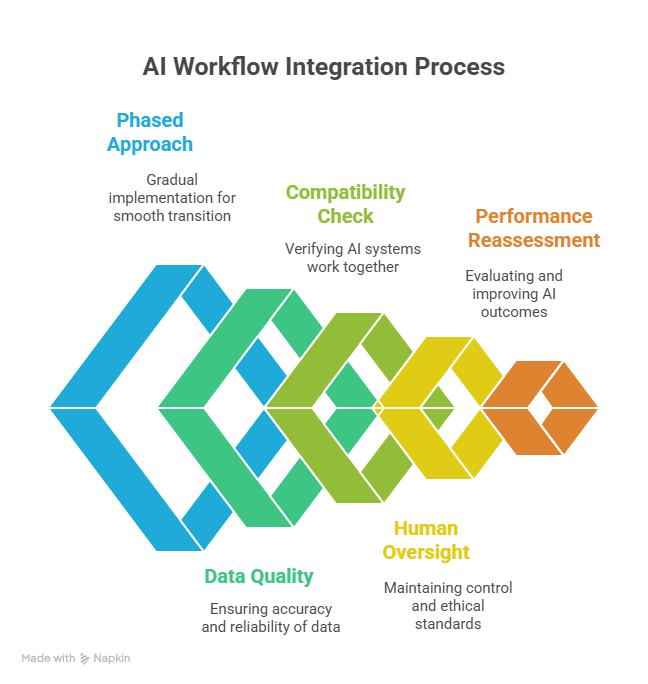
- Adopt a Phased Approach: Start small, validate outcomes, then scale.
- Prioritize Data Quality: AI models are only as strong as the data they’re trained on.
- Ensure Compatibility: Select tools that integrate easily via APIs and webhooks.
- Maintain Human Oversight: Use AI as a decision assistant, not a replacement.
- Reassess Regularly: Monitor performance and retrain AI models as your business evolves.
Challenges and Solutions in AI Workflow Integration
Challenge | Description | Solution |
Legacy Infrastructure | Outdated systems lack integration capabilities. | Choose platforms that support middleware or APIs for easy AI adoption. |
Data Fragmentation | Data silos reduce AI effectiveness. | Implement centralized data lakes for unified access. |
Skill Gaps | Employees may lack AI familiarity. | Offer training and involve teams early in adoption. |
Cost Concerns | High setup costs can hinder investment. | Use scalable, no-code solutions like Cflow to minimize costs. |
Security Risks | Data privacy issues during AI integration. | Adopt AI systems with enterprise-grade encryption and compliance. |
Applications and Use Cases of AI Workflow Automation
AI integration is revolutionizing workflows across industries:
- Finance: AI automates reconciliations, detects fraud, and enhances forecasting.
- Healthcare: Automates patient data entry, claims processing, and diagnostic workflows.
- Retail: Personalizes product recommendations and streamlines supply chains.
- Human Resources: Simplifies employee onboarding and improves workforce analytics.
- IT Operations: Detects system anomalies and automates incident responses.
Each of these use cases showcases how AI enhances operational efficiency and frees human resources for strategic tasks.
How AI Enhances Collaboration and Productivity Across Teams
AI workflow automation strengthens collaboration by:
- Centralizing workflow visibility for all departments.
- Automating task assignments and approvals based on priority.
- Providing data-driven performance insights in real time.
- Integrating directly with communication platforms like Slack and Microsoft Teams.
These capabilities enable teams to stay aligned, informed, and proactive, which reduces friction and improves output quality.
How Cflow Simplifies AI Workflow Integration
Cflow offers a unified, no-code AI workflow automation platform that makes integration simple, fast, and effective. This AI-powered workflow platform can seamlessly integrate with existing workflows. The no code visual workflow builder can be used to create workflows for approval-based processes.
Here’s how Cflow helps:
- AI-Driven Workflow Creation: Build intelligent workflows without coding.
- Seamless Integrations: Connect effortlessly with CRMs, ERPs, and over 1,000 business apps.
- Predictive Insights: Use AI analytics to predict bottlenecks and suggest improvements.
- Enhanced Collaboration: Manage approvals, notifications, and communication in one place.
- Data Security and Compliance: Enterprise-grade encryption ensures complete information protection.
Cflow transforms static workflows into self-learning, data-driven ecosystems—helping organizations move toward operational intelligence.
Future Trends in AI Workflow Automation
AI workflow automation is rapidly evolving, moving beyond efficiency gains to enabling intelligent, predictive, and fully autonomous operations. The next phase of digital transformation will be defined by deeper AI integration, data-driven decision-making, and seamless collaboration between humans and machines. Below are the emerging trends shaping the future of AI workflow automation:
1. Hyperautomation
Hyperautomation combines AI, machine learning, robotic process automation (RPA), and data analytics to automate entire business ecosystems end-to-end. In the coming years, hyperautomation will enable businesses to unify fragmented processes, improving transparency and coordination across every function, from finance to operations and customer support.
2. Cognitive Process Automation
Cognitive process automation goes beyond rule-based execution by infusing human-like intelligence into workflows. It enables systems to interpret context, understand language, and make nuanced decisions.
3. Predictive Workflow Optimization
AI-driven workflows are increasingly adopting predictive analytics to foresee bottlenecks, inefficiencies, and risks before they occur. Predictive models can assess workflow data and recommend proactive actions.
4. AI-as-a-Service Models
AI-as-a-Service (AIaaS) democratizes access to AI by providing cloud-based AI tools and APIs that can be integrated into existing workflows with minimal setup. Businesses can deploy advanced models without heavy infrastructure investments.
5. Self-Healing Workflows
Self-healing workflows represent the next leap in process automation, where systems can automatically detect errors, diagnose issues, and execute corrective actions without human intervention.
6. Autonomous Decision-Making Systems
AI is evolving to a stage where it can make independent, context-aware decisions based on historical data, risk factors, and predictive patterns. This level of automation transforms workflows into self-regulating ecosystems.
7. Human-AI Collaboration Platforms
Rather than replacing humans, future AI workflow systems will enhance human creativity and decision-making by providing intelligent assistance and contextual insights.
Collaborative AI interfaces will allow employees to co-work with automation tools, analyzing data, testing scenarios, and executing actions faster.
8. Responsible and Ethical AI Automation
As automation grows more powerful, organizations are prioritizing transparency, fairness, and accountability in AI decision-making. Ethical AI frameworks will govern how data is used, stored, and interpreted.
9. Generative AI in Workflow Automation
Generative AI will play an increasingly influential role by creating adaptive workflow templates, automating report generation, and simulating process outcomes before implementation.
This capability will empower businesses to design, test, and optimize workflows faster than ever, driving innovation and agility at every level of process management.
Final Thoughts
Integrating existing workflows with AI workflow automation is a strategic step toward intelligent operations. Rather than replacing legacy systems, AI enhances them, adding intelligence, speed, and adaptability. Businesses that make this move now position themselves for long-term success in an increasingly automated world.
Cflow empowers this transformation with its no-code platform, enabling AI-powered workflows that are efficient, secure, and fully integrated. Experience the next level of automation, start your free Cflow trial today and transform your workflows intelligently.
FAQs
1. What Are the Steps to Integrate AI Into Existing Workflows?
Assess current workflows, clean and prepare data, choose an AI-ready platform, pilot automation, and then scale gradually across departments.
2. How Does AI Workflow Automation Improve Efficiency?
AI eliminates repetitive tasks, predicts outcomes, and reduces errors, allowing teams to focus on strategic priorities.
3. Can AI Integrate With Legacy Systems?
Yes, modern workflow platforms like Cflow use APIs and connectors to integrate with legacy systems without major reengineering.
4. What Challenges Should Businesses Expect During Integration?
Key challenges include data fragmentation, integration complexity, and user adaptation—but they can be resolved through phased implementation and employee training.
5. Is AI Workflow Automation Suitable for SMBs?
Absolutely. No-code tools like Cflow make AI workflow automation affordable and easy to deploy for small and mid-sized businesses.
What should you do next?
Thanks for reading till the end. Here are 3 ways we can help you automate your business:

Do better workflow automation with Cflow
Create workflows with multiple steps, parallel reviewals. auto approvals, public forms, etc. to save time and cost.

Talk to a workflow expert
Get a 30-min. free consultation with our Workflow expert to optimize your daily tasks.

Get smarter with our workflow resources
Explore our workflow automation blogs, ebooks, and other resources to master workflow automation.